Connect the Dots · November 1, 2026 · 5 min read
What vibe coding actually is, in one diagram
Vibe coding means describing what you want in plain words and letting AI write the code. Here's the whole loop in one picture, station by station.
"Vibe coding" sounds like a joke. It's a real way to build software, and for many people it's how they build their first app. You describe what you want in plain words. An AI writes the code. You try the result and ask for changes.
That's the short version. The longer version is easier to see than to read, so here it is as one diagram, the same one we use in lesson 3.3.
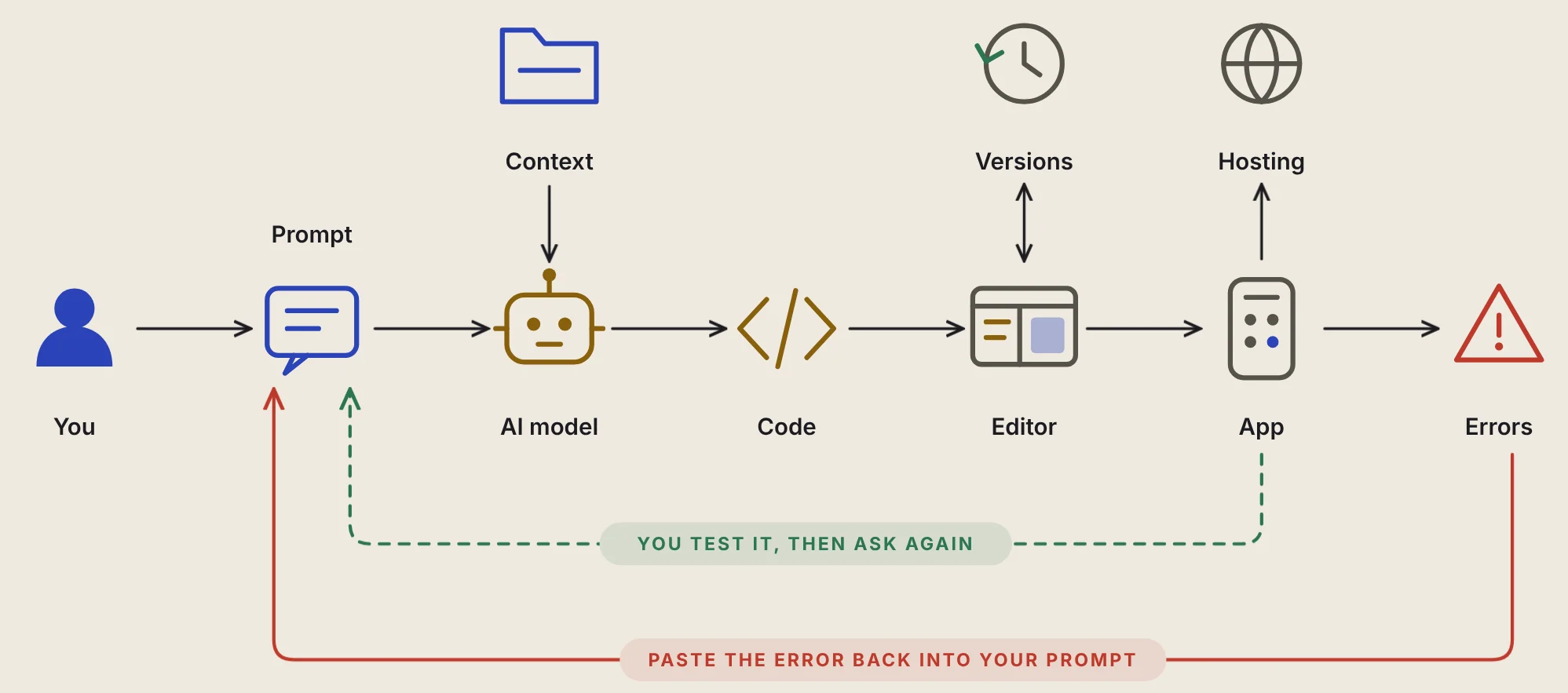
The main path: left to right
You. Every app starts with a person who knows a problem and what they want. That's the only skill you need to start.
Prompt. Your plain-words description of what to build or change. A good one says who it's for, what it does and how it looks.
AI model. The engine that turns your words into code. It's fast and eager, and sometimes wrong without noticing.
Code. The instructions the AI writes. You don't have to read it to start. You do have to test what it makes.
Editor. The tool where the code lives and a preview runs. Tools like Bolt, Lovable, Replit and v0 put a chat on one side and your app on the other.
App. The thing you can actually use. Looking right isn't the same as working right, so try it like a real person would.
Errors. When something breaks. That's normal. Copy the exact error, paste it back to the AI and ask it to fix it.
The three stations above the line
Context feeds the AI: extra material it reads along with your prompt, like a sketch, an example or a screenshot. Share only what's safe to share.
Saved versions are snapshots of your app at moments when it worked. Save when it works, so you can roll back when it breaks.
Hosting puts your app on the internet, so it has a link anyone can open.
The loop underneath is the real skill
The green dashed line runs from the app back to the prompt. That's the test loop: ask, look, fix, repeat. It's where most of the work happens. The red line under it is the error loop: when something breaks, the error goes straight back into your next prompt.
Beginners often try to describe the whole app in one giant prompt. The AI then guesses at everything you didn't say, and the more it guesses, the more it gets wrong. Small loops work better. Ask for one screen with one job. Test it. Ask for the next change.
What the diagram doesn't promise
Vibe coding gets you to a working first version fast. It doesn't make the hard questions go away: whether people want your app, whether it keeps their data safe, whether it still works when a hundred people use it. Those are the other stations on the full map, and they're why Zero to One with AI has 46 lessons and not one.
If you want to try it, lesson 3.3 walks you through building a small reminder writer with one prompt.